
Rounding
Rounding
Rounding
Program #: 600
Module: System Administration
Overview
Use Rounding (program #600) to define rounding amounts for Invoicing and Payments. The Rounding program allows you to define rounding by dealer. SBN stores the values in this program in options bl117 through bl124. Each dealer has a separate option definition.
Note: These values should be changed inside Rounding and not through Options (program #1887).
To access this program, select Rounding (program #600) from the main menu of SBN.
The Rounding Window
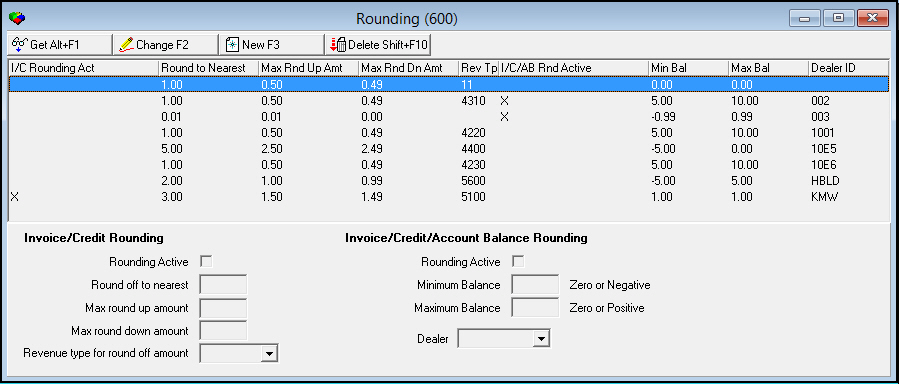
The following graphic shows the Rounding window. The upper pane displays suggested rounding parameters.
Field/Column Descriptions
The following table describes the fields and columns used in Rounding.
|
Field/Column |
Description |
|
I/C Rounding Act |
Indicates Invoice and Credit rounding is active. |
|
Round to Nearest |
Nearest digit SBN rounds balances to. |
|
Max Round Up Amt |
Maximum amount to round balances up. |
|
Max Round Down Amt |
Maximum amount to round balances down. |
|
Revenue Type |
Revenue type for which rounding amounts are added or deducted. |
|
Invoice/Credit/Account Balance Active |
Indicates payment rounding is active. |
|
Min Balance |
Amount that can be subtracted from a balance when rounding. |
|
Max Balance |
Maximum amount that can be added to the balance when rounding. |
|
Dealer ID |
Dealer ID to which the rounding options apply. (This list originates from program #1743.) |
|
Invoice/Credit Rounding The fields in this section apply to invoicing balances throughout SBN. When you apply rounding to invoices, the rounded off amount prints on the invoices. |
|
|
Rounding Active |
Enter a check mark in this field to activate rounding. |
|
Round off to nearest |
Type the nearest digit to round to. As you tab from this field to the next, SBN enters suggested rounding amounts in the maximum rounding fields. |
|
Max round up amount |
You may accept the suggested amount or type a different maximum round up amount. |
|
Max round down amount |
You may accept the suggested amount or type a different maximum round down amount. |
|
Revenue type for round off amount |
Select the revenue type to which the rounding parameters apply. |
|
Invoice/Credit/Account Balance Rounding The fields in this section apply to payment balances throughout SBN. |
|
|
Rounding Active |
Enter a check mark in this field to activate rounding. |
|
Minimum Balance |
Zero or negative dollar amount that may be subtracted from an account balance when rounding. |
|
Maximum Balance |
Zero or positive dollar amount that may be added to an account balance when rounding. |
|
Dealer ID |
Dealer ID that the rounding options apply. (This list originates from program #1743.) |
Changing Rounding Parameters
Use the following steps to change rounding parameters:
1. Choose Change.
w The fields open for changes and fill with suggested rounding amounts.
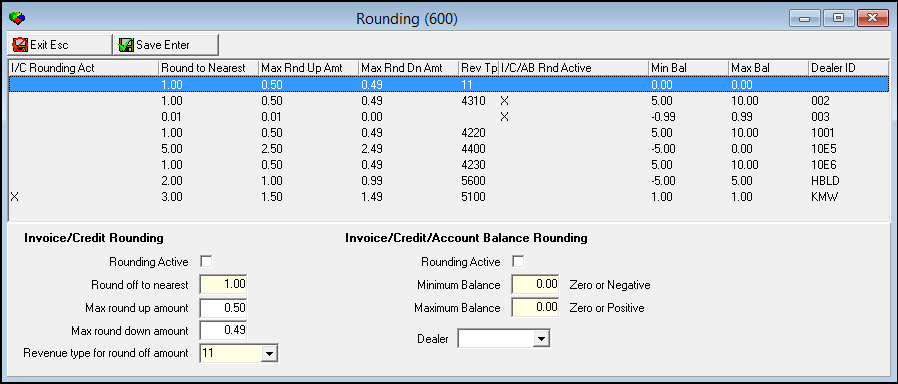
2. Enter changes in the fields, as needed.
3. Choose Save.
w SBN applies the rounding parameters globally through Invoicing and Payments
Using Common Functions
See the reference document Common Functions in SBN for more information on:
-
Viewing the Details of an Entry
-
Adding and Entry
-
Deleting an Entry
Modifications and Updates to Rounding
The following table lists modifications and updates to the Rounding document.
|
Mod Number |
Date |
Description |
|
n/a |
8/25/14 |
Images updated. |
F1 Help
| Delphi Forms | blroundform |
| Program Numbers | 600 |