
Inspection Tickets
Inspection Tickets
Inspection Tickets
Module: Account Management
Overview
Use the Inspection Tickets report to print service tickets for inspections, typically for fire alarm systems.
To access this report, select Inspection Tickets (report #2089) from the main menu of SBN or enter a check mark in the Run Inspection Tickets field in Maintenance Ticket Generation (program #701).
The Inspection Tickets
This window contains two panes: use the upper pane to define the content of the report; use the lower pane to define the job output - how, when, and where you want to print the report.
Note: See Report Parameters Pane for information on the fields in the lower pane, which are the same in every report.
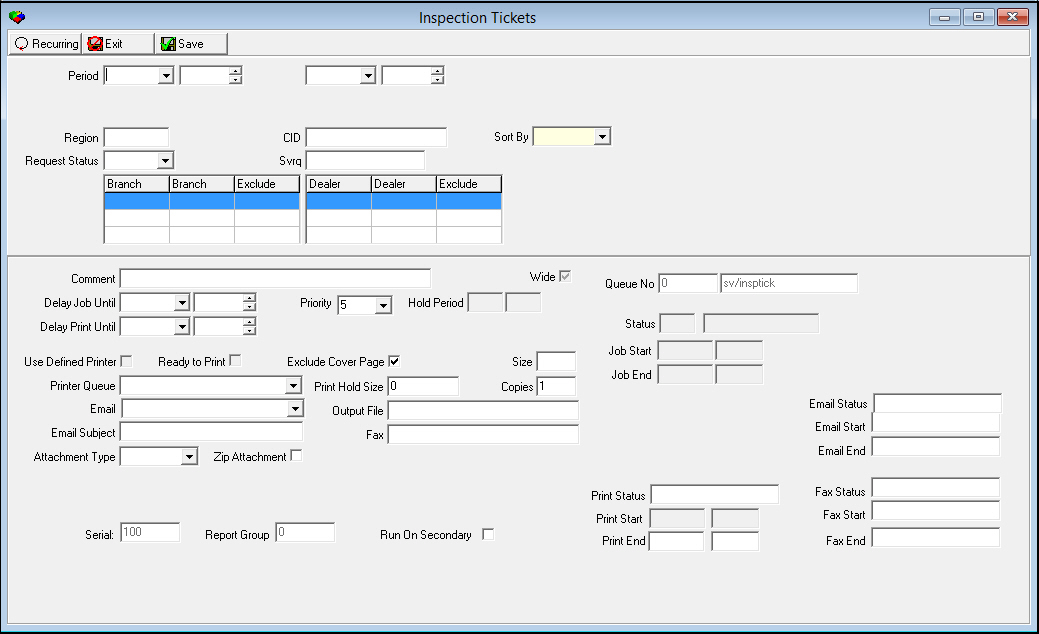
Field Descriptions
The following table describes the fields used in the upper pane of Inspection Tickets.
Field |
Description |
Period |
|
Date - From (No label) |
You may select a range of dates to print service tickets for fire inspections that occur within the range. Select the beginning date of the range. O If you leave this field blank, SBN defaults to the current day. |
Time - From (No label) |
You may select a range of time to print service tickets for fire inspections that occur within the range. Select the beginning time of the range. |
Date
- To |
You may select a range of dates to print service tickets for fire inspections that occur within the range. Select the ending date of the range. |
Time
- To |
You may select a range of time to print service tickets for fire inspections that occur within the range. Select the ending time of the range. |
Region |
You may type a specific region to limit the print to service tickets associated with that region. O If you leave this field blank, the report includes all regions. |
CID |
You may type a specific CID to limit the print to service tickets for that CID. O If you leave this field blank, the report includes all CIDs. |
Sort by |
You must select a sorting parameter for this report: l None l Technician l Zip code |
Request Status |
You may select a service request status to limit the print to service tickets that match that status. O If you leave this field blank, the report includes all service request statuses. |
Svrq |
You may type a specific service request number to limit the print to service tickets for that request. O If you leave this field blank, the report includes all service requests. |
Branch Range |
|
Branch |
You may select up to three ranges of branches to limit the print to service tickets associated with branches within the ranges. Select the beginning branch number of a range. (These menus originate from program #1530.) |
Branch |
You may select up to three ranges of branches to limit the print to service tickets associated with branches within the ranges. Select the beginning branch number of a range. (These menus originate from program #1530.) |
Exclude |
You may exclude ranges of branches from the print by typing the ranges of branches and then entering check marks in these fields. |
Dealer Range |
|
Dealer |
You may select up to three ranges of dealer IDs to limit the print to service tickets associated with dealer IDs within the ranges. Select the beginning dealer ID of a range. (These menus originate from program #1537.) |
Dealer |
You may select up to three ranges of dealer IDs to limit the print to service tickets associated with dealer IDs within the ranges. Select the beginning dealer ID of a range. (These menus originate from program #1537.) |
Exclude |
You may exclude ranges of dealer IDs from the print by selecting the ranges of dealer IDs and then entering a check mark in this box. |
Running and Viewing a Report
For information on running and viewing a report, see Common Functions in SBN.
Report Example
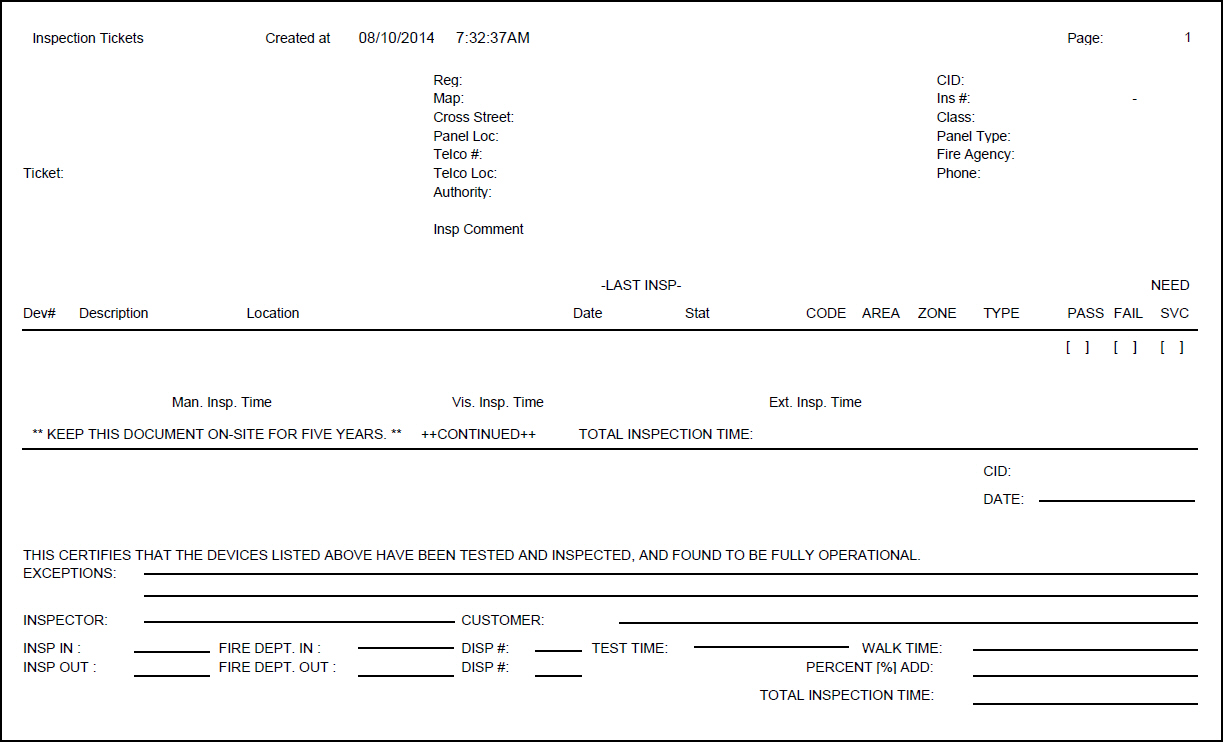
The following graphic shows an example of the output of the Inspection Tickets.
Column Descriptions
The following table describes the columns used in the output of the report.
Column |
Description |
Alarm Company Information |
|
(No label) |
Alarm company name, address, phone number. |
Installation Information |
|
Ticket |
Number of the service inspection ticket. |
Name (No label) |
Installation name - from Data Entry. |
Reg |
Installation service region. |
CID |
CID of the installation. |
Address |
Installation address, including street, city, state, and zip code. |
Map |
Map information - from Data Entry. |
Ins# |
Installation number |
Cross Street |
Cross street - from Data Entry. |
Class |
Displays the selected Class Code - from Data Entry. |
pane Type |
Type of pane at this installation. |
Phone (No label) |
Phone number of the installation |
pane Location |
pane location - from Data Entry. |
Fire Agency |
Inspection agency name from inspections. |
Telco # |
Telco number - from Data Entry. |
Phone |
Agency phone number. |
Telco Loc |
Location of the telco - from Data Entry. |
Authority |
Inspector ID and description. |
Insp Comment |
Comments from service inspection ticket. |
Device Information |
|
Dev # |
Device number. |
Item # |
Item code. |
Description |
Text description of the item. |
Location |
Location of the device. |
Last Insp Date |
Date the device was last inspected. |
Last Insp Stat |
Status of the last device inspection. |
CODE |
Device zone code. |
AREA |
Device zone area. |
ZONE |
Device zone. |
TYPE |
Device inspection type. |
PASS [ ] |
Inspector should enter a check mark in this box if the device passes the test. |
FAIL [ ] |
Inspector should enter a check mark in this box if the device fails the test. |
NEED SVC [ ] |
Inspector should enter a check mark in this box if the device needs service. |
Man. Insp. Time |
Time required to perform a manual inspection; displayed in days:hours:minutes. |
Vis. Insp. Time |
Time required to perform a visual inspection; displayed in days:hours:minutes. |
(No label) |
Company-specific message. |
Ext. Insp. Time |
Extended inspection time = manual time + visual time; displayed in days:hours:minutes. |
Total inspection time |
Total expected time required to inspect all devices. O SBN uses the following formula to calculate the total time of an inspection: Total Time = (extended time * difficulty factor) + difficulty time. |
Inspection Information |
|
Name / Address |
Installation name and address. |
CID |
CID for this installation. |
Date |
Inspector should enter the current date. |
(No label) |
Company-specific message. |
Exceptions |
Inspector should enter any exceptions noted during the test. |
Inspector |
Inspector signs here. |
Customer |
Customer signs here. |
Company-specific inspection results; to be completed during inspection |
|
Insp In |
|
Fire Dept In |
|
Disp # |
|
Test Time |
|
Walk Time |
|
Insp Out |
|
Fire Dept Out |
|
Disp # |
|
Percent (%) Add |
|
Total Inspection Time |
|
Button Functions
The following table displays the buttons, describes the shortcut keys, actions, and functionality.
Button |
Name |
Shortcut Key |
Action |
Description |
|
Recurring |
Alt+F1 |
2089 |
Open fields for recurring/template reports. |
|
Exit |
Esc |
2089 |
Exit without saving. |
|
Save |
Enter |
2089 |
Save existing record. |



Modifications and Updates to Inspection Tickets
The following table lists modifications and updates to the Inspection Tickets document.
Mod Number |
Date |
Description |
n/a |
7/18/14 |
Images updated. |