
Packages
Module: System Administration
Overview
Use Packages (program #1777) to group items together and assign a single price for all items contained in a package. When you select a package in the Detail tab of a work order, the tab displays the package item code and price, and displays the individual components contained in the package for report, inventory, and invoicing purposes.
The Packages program contains a sublevel that has three additional tabs for entering specific information for each package.
To access this program, select Packages (program #1777) from the main menu of SBN.
The Packages Window
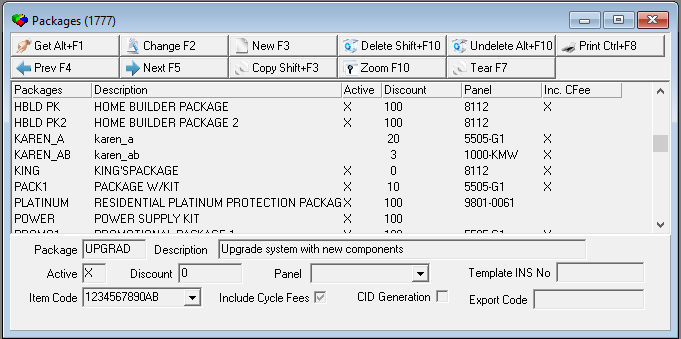
The following graphic shows Packages as the program opens. The upper pane displays previously defined packages.
Field/Column Descriptions
The following table describes the fields and columns used in the main window of Packages.
Field/Column |
Description |
Packages |
Abbreviation that identifies the package. |
Description |
Text description of the package. |
Active |
If this column displays an X, the package is active. |
Discount |
Maximum discount percentage that allowed on the package in the work order. O If you do not want to control the amount of discount given on this package, type 100 for the discount value. |
Panel |
Panel number to associate with this package. (This menu originates from program #1742.) O When you associate a panel with a package and a user selects that package in a work order and then jumps to Data Entry, the Panel field in the CID grid of Data Entry defaults with the associated panel. |
Include Cycle Fee |
If this column displays an X, the cycle fees per item display on the work order. O If this field is blank, SBN enters one cycle fee for the entire package. |
Item Code |
Item number that represents the package as a whole; defined in Items (program #1535). |
Export Code |
Export Code can have two values separated by a forward slash. One of the two values is passed to the ADC interface through SBN Service Installation Creation. |
Using Common Functions
See the reference document Common Functions in SBN for more information.
Note: After you add a package, zoom into the sublevel to add
q Items
q Programs
q Sources
Zooming into the Sublevel of Packages
The sublevel of Packages contains three tabs:
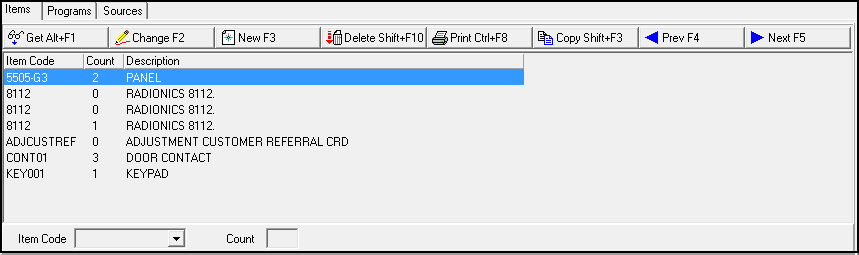
Items - in which you add items to a selected package.
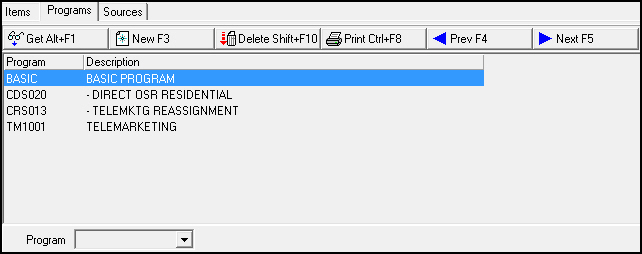
Programs - in which you define valid marketing programs for selling the selected package. The main window of Marketing contains a program menu with all available marketing programs. (This menu originates from program #1701.) Packages associated with the selected program are available for selection in the Work Order Details tab.
Note: If a marketing inquiry has a program assigned in the Program field of Marketing (program #562) that is not linked to any packages in Packages, the Packages menu on a work order for that marketing inquiry includes all available packages.
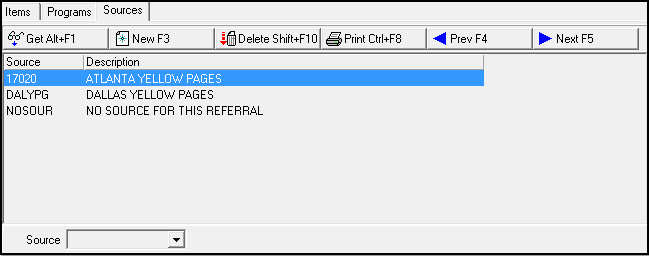
Sources - in which you define valid marketing sources to attach to the selected package. The main window of Marketing contains a source menu with all available marketing sources. (This menu originates from program #1710.) Packages with the selected source are available in the Work Order Details tab. If you choose not to specify sources, SBN considers all sources valid.
The Items Tab
The following graphic shows the Items tab. The tab displays items previously added to the selected package.
Field/Column Descriptions
The following table describes the fields and columns used in the Items tab.
Field/Column |
Description |
Item Code |
Unique item identifier. (This menu originates from program #1535.) |
Count |
Quantity of the item to install with the package selected. |
Description |
Text description of item selected. The description appears in the user's language, if defined in the Translations tab of Items (program #1535). |
The Programs Tab
The following graphic shows the Programs tab. The tab displays programs previously attached to the selected package.
Field/Column Description
The following table describes the fields and columns used in the Programs tab.
Field/Column |
Description |
Program |
Menu with available marketing programs. (This menu originates from program #1701.) |
Description |
Text description of marketing program selected. |
The Sources Tab
The following graphic shows the Sources tab. The tab displays the sources previously associated with the selected package.
Field/Column Descriptions
The following table describes the fields and columns used in the Sources tab.
Field/Column |
Description |
Source |
Menu with available marketing sources (This menu originates from program #1710.) |
Description |
Text description of the selected marketing source. |
Button Functions
The following table displays the buttons, describes the shortcut keys, actions, and functionality.
Button |
Name |
Shortcut Key |
Action |
Description |
|
Get |
ALT+F1 |
1777/ 1 |
Get record. |
|
Change |
F2 |
1777/ 2 |
Change selected record. |
|
New |
F3 |
1777/ 3 |
Create new record. |
|
Delete |
SHIFT+F10 |
1777/ 4 |
Delete selected record. |
|
Undelete |
ALT+F10 |
1777/ 5 |
Restore deleted record. |
|
CTRL+F8 |
1777/ 6 |
Print selected records. |
|
|
Zoom |
F10 |
1777/ 999 |
Zoom in/out of sublevel. |
|
Copy |
SHIFT+F3 |
1777/ 999 |
Copy current record. |
|
Tear |
F7 |
1777/ 999 |
Lists details of selected field. |
|
Previous |
F4 |
1777/ 999 |
Select last record. |
|
Next |
F5 |
1777/ 999 |
Select next record. |











Modifications and Updates to Packages
The following table lists modifications and updates to the Packages document.
Mod Number |
Date |
Description |
07.79.22698, 07.79.22659 |
07/16/13 |
Work orders on marketing inquiries with programs that are not linked to any packages now display all packages in the Packages menu. |
n/a |
08/20/14 |
Images updated. |
07.91.26266, 08.91.11752, 08.91.11754, 07.91.26282 |
11/11/19 |
New Export Code field added. Image updated. |