
SQL Server Always On High Availability
This is an example, not a recommendation. It records a configuration Innovative built and proved end to end in its own lab, and is provided for informational purposes only. Innovative does not support or recommend any particular system. Licensing, networking, security policy, and infrastructure differ between installations — verify every address, name, and account against your own environment and standards, and involve your database and network administrators, before running any command or configuration found here. See Start Here.
A two-node SQL Server Always On Availability Group makes the SBN databases survive the loss of one SQL Server. All SBN databases (ibs, sbnmaster, etc.) form one failover unit — they depend on each other at run time. Afterward SBN connects to the listener (one DNS name + virtual IP) instead of a single server; nothing about how SBN is installed changes.
Recommended connection model — one proxy IP
Innovative's recommendation: place one proxy IP in front of the HA pair. Users and applications only ever connect to that single address; it redirects to whichever server is currently active. Nothing that connects to SBN ever needs to know which physical node is primary, and a failover requires no client-side change.
SQL Server delivers this as a built-in part of Always On: the Availability Group listener. The listener is a DNS name + virtual IP owned by the failover cluster; it always answers on the current primary, and when the primary changes, the cluster moves the address automatically. No separate proxy product is required — on a normal LAN the listener is the proxy IP (created in Step 6). In a cloud VPC the same single-address model is kept by backing the listener with a secondary private IP or a network load balancer (Steps 1 and 6).
SQL Server editions
Edition | What it allows | SBN consequence |
|---|---|---|
Enterprise | One Availability Group holding many databases, a single listener, readable secondary, 3+ replicas. | The recommended shape: all SBN databases in one group behind one listener. The steps below describe this. |
Standard | Basic Availability Groups only: one database per group, exactly two replicas, no readable secondary, one listener per group. | Workable, with a different shape: one Basic AG per SBN database, failed over as a set, no unified listener. See the Standard Edition variant. |
Developer | Feature-identical to Enterprise. | Test and lab use only — not licensed for production. |
Requirements
- Two Windows Servers (2019 or later), each able to hold a full copy of all SBN databases. Identical drive letters and data/log paths on both (automatic seeding requires matching paths).
- The same SQL Server edition on both nodes — Enterprise for the single-group design (see the edition table above).
- The same instance collation on both nodes, matching the collation the SBN databases were built with (set at SQL Server install). A mismatch causes "Cannot resolve the collation conflict" errors after a failover.
- Same Active Directory domain for the cluster nodes, mixed-mode authentication, TCP/IP enabled. (A domain-independent workgroup cluster with certificate-authenticated endpoints is possible — Innovative's lab runs this shape — but domain-joined is the standard path.)
- SQL Server service running under a domain account on both nodes, so the nodes authenticate to each other for data movement.
- A third machine for the file-share witness.
- Ports open between nodes and to clients: SQL (for example 1433), the mirroring endpoint (5022), cluster heartbeat (3343), and any load-balancer health-probe port. In a cloud VPC, open these in the relevant security groups — including the dynamic RPC range between nodes, or cluster creation hangs.
- Spare static IP addresses on the nodes' subnet(s) for the virtual IPs reserved in Step 1.
Topology
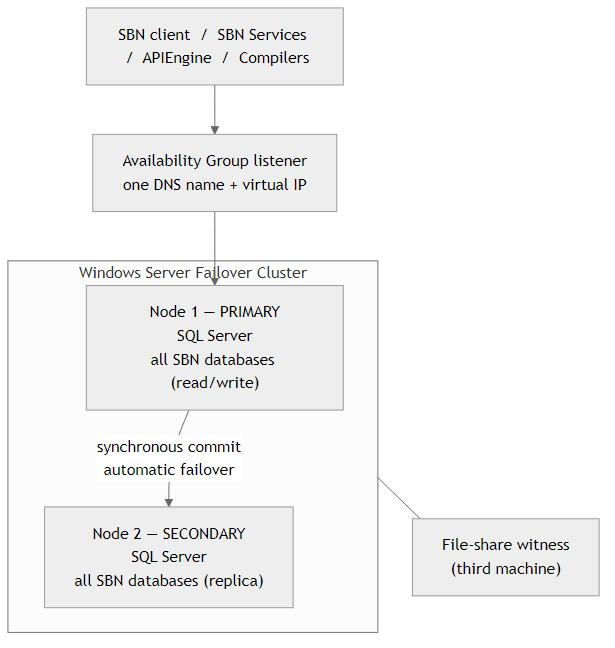
Synchronous commit + automatic failover loses no committed data. On failover the listener virtual IP moves to the new primary and SBN reconnects to the same name. The file-share witness lets the two-node cluster keep quorum when one node is down.
Step 1 — Plan and reserve virtual IPs
Do this before building anything. A virtual IP (VIP) is an address that floats to whichever node is currently active, so clients use one stable address and a failover requires no downstream reconfiguration.
Two VIPs are needed here (see also SBN Network Architecture):
- AG listener VIP — the single proxy IP from the recommended connection model. SBN, the Compilers, APIEngine, and the SBN client all connect to this; it always resolves to the current primary node (created in Step 6).
- Cluster core VIP — the failover cluster's own management address, separate from the listener VIP (used in Step 2).
Reserve these as static addresses, outside any DHCP scope:
Address | Used by |
|---|---|
Node 1 IP / Node 2 IP | The two servers (static) |
Cluster core VIP | Cluster name object (Step 2) |
AG listener VIP | Availability Group listener (Step 6) — one per subnet |
Witness host IP | File-share witness (Step 2) |
Choose the listener DNS name now (its virtual network name, for example SBN-CLUSTER-AG). SBN connects to the name; DNS resolves it to the VIP.
How the VIP answers depends on where you run:
- On-premises / flat LAN: the failover cluster manages VIPs natively — the active node answers ARP for the VIP, so it moves on failover with no extra infrastructure.
- Cloud VPC (for example AWS EC2): a VPC does not broadcast a moving cluster IP, so the VIP needs extra wiring. Either assign the listener VIP as a secondary private IP on each node (one per subnet if nodes span availability zones), or front the listener with a network load balancer that health-probes the nodes and forwards to the current primary. The listener's health-probe port must differ from the cluster core IP's probe port.
- Multi-subnet: the listener needs one VIP per subnet, and clients connect with
MultiSubnetFailover=True(Step 8).
Verify
- Every address above is reserved static, recorded, and outside any DHCP scope.
- The listener DNS name is chosen and can be created in DNS.
- In a cloud VPC: you know which pattern you will use (secondary private IPs or a load balancer).
Step 2 — Build the Windows Failover Cluster
No shared storage is needed — each node keeps its own copy of the databases.
On both nodes, add the Failover Clustering feature:
From one node, validate and create the cluster using the cluster core VIP from Step 1:
Add the file-share witness. On the witness machine create a folder, share it, and grant the cluster computer account Full Control; then from a cluster node:
Verify
Get-ClusterNode shows both nodes Up; Get-ClusterQuorum shows NodeAndFileShareMajority; Get-ClusterResource shows the cluster core IP online on the reserved VIP.
Step 3 — Enable Always On on each SQL Server
On each node (a one-time switch that requires a service restart): SQL Server Configuration Manager → SQL Server Services → right-click the SQL Server service → Properties → Always On Availability Groups tab → check Enable Always On Availability Groups → OK → restart the service. Or in PowerShell (then restart):
Verify
Must return 1 on both nodes.
Step 4 — Set the SBN databases to FULL recovery
An Availability Group only accepts databases in the FULL recovery model. The SBN install creates them in SIMPLE, so switch each one and take a full backup to start its log chain. Run on the primary:
Note: once the databases run in FULL recovery, schedule regular transaction-log backups or the log files grow without bound.
Verify
Every SBN database must read FULL.
Step 5 — Create the Availability Group
First, on each node, enable contained database authentication — sbnpro is a contained database, and a secondary cannot restore or seed it without this setting (the restore fails with Msg 12824):
Note: this enables authentication for the contained database that SBN already ships — it does not change the login model. SBN logins remain server-level SQL logins, kept aligned across the replicas by the login replication agent (Step 7).
Use the New Availability Group Wizard in SQL Server Management Studio, connected to the primary:
- Expand Always On High Availability → right-click Availability Groups → New Availability Group Wizard.
- Name the group (for example
SBNAG). Cluster type: Windows Server Failover Cluster. - Select databases: tick all SBN databases (they must show FULL recovery with a full backup taken — Step 4).
- Replicas: add the second node. Set both to Availability Mode = Synchronous commit and Failover Mode = Automatic.
- Data synchronization: Automatic seeding (this is why data/log paths must match on both nodes).
- Listener: create it here or in Step 6. In a cloud VPC the wizard's listener step is often awkward — skip it here and do Step 6.
- Finish.
T-SQL equivalent: CREATE AVAILABILITY GROUP … FOR DATABASE ibs, sbnapi, sbnhist, sbnint, sbnmaster, sbnnrep, sbnpro REPLICA ON …, then ALTER AVAILABILITY GROUP … JOIN on the secondary — see the Microsoft creation reference below.
Verify
In SQL Server Management Studio: Always On High Availability → Availability Groups → (your group) → Show Dashboard. All SBN databases Synchronized on both replicas, no warnings.
Step 6 — Create the listener on the virtual IP
The listener is the DNS name + the AG listener VIP from Step 1.
- In SQL Server Management Studio, under the Availability Group, right-click Availability Group Listeners → Add Listener. Enter the DNS name (for example
SBN-CLUSTER-AG), the port (for example1433), and the AG listener VIP. - Cloud VPC: make the VIP routable with the pattern chosen in Step 1 — a secondary private IP on each node, or a network load balancer with its own probe port (distinct from the cluster core IP's probe port). Multi-subnet: one listener VIP per subnet.
Creating the listener registers a cluster client-access point with RegisterAllProvidersIP = 1 — the cluster registers the listener's virtual IP for every replica's address in DNS. With a single-subnet VIP that is fine. For multi-subnet listeners, clients that cannot pass MultiSubnetFailover=True (older drivers) may try the wrong VIP and stall until the DNS cache expires; lower HostRecordTTL on the listener resource so they reconnect to the new primary's VIP quickly. See the Microsoft listener references below.
Verify
The name resolves to the listener VIP, and the query returns the current primary node.
Step 7 — Replicate the server logins
An Availability Group replicates database contents but not server-level logins, which live in master. If an SBN login does not exist on the secondary with the same SID, a failover orphans the database users and SBN logins fail. SBN creates SQL logins whenever operators and service accounts are added, so a one-time copy is not enough — Innovative provides a login replication agent (sync-ag-logins.sql, with the companion audit verify-login-sync.sql) that keeps the nodes continuously aligned.
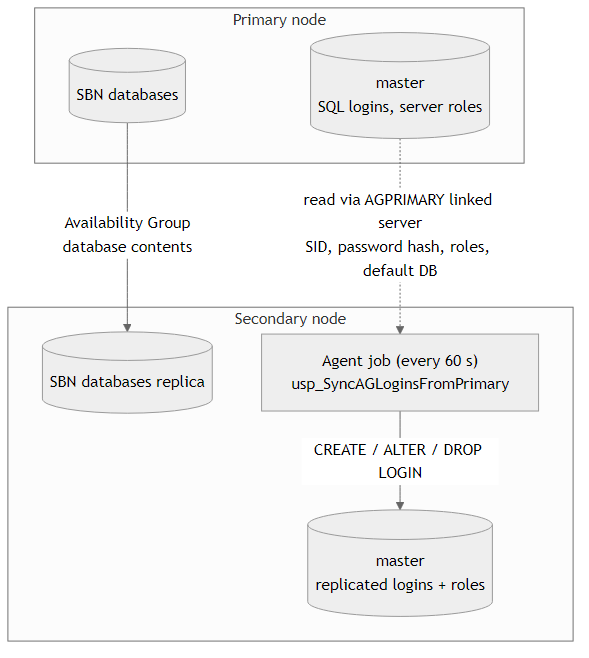
7.1 — How it works
The installer script creates, on every replica, a stored procedure (master.dbo.usp_SyncAGLoginsFromPrimary) and a SQL Server Agent job (AG - Sync Logins From Primary, every 60 seconds). On the current primary the job does nothing. On a secondary it reads the SQL logins from the current primary — through a linked server pointing at the listener — and creates or updates them locally with the same SID, password hash, disabled state, and default database. Deletions propagate too: when a login no longer exists on the primary, the agent drops it on the secondary. sa, the endpoint logins, and internal ## logins are never touched, and each change is isolated so one failure cannot abort the run.
Server roles replicate too — this is essential for SBN. SBN operators get their write access from server roles, and those roles and memberships live in master, so they do not travel through the Availability Group. The agent recreates the custom SBN server roles on the secondary, re-applies their server-level grants, and mirrors each synced login's role memberships. Without this a failover would leave every operator able to log in but unable to write. Create operator logins the normal SBN way (User Maintenance, which assigns the roles) — never a bare CREATE LOGIN, which has no roles.
7.2 — Set up the agent
On each replica, create the linked server the agent reads through (name it exactly AGPRIMARY; point it at the listener from Step 6):
The mapped login must be able to read password hashes on the primary (sa, or any sysadmin login). If your instances use verified TLS certificates you can tighten @provstr; the form above works everywhere.
Then on each replica run the installer (idempotent — safe to re-run):
Confirm the SQL Server Agent service is Running and set to Automatic on every replica — the job cannot run without it.
7.3 — Test the replication
- Create a test login on the primary:
CREATE LOGIN HATEST01 WITH PASSWORD = '<a strong password>', CHECK_POLICY = OFF; - Trigger the sync on the secondary (or wait up to 60 seconds):
EXEC master.dbo.usp_SyncAGLoginsFromPrimary; - Run the audit on the secondary —
verify-login-sync.sqlcompares every SQL login on the primary against the local copy. Zero rows returned = logins are replicated correctly. Any row names the login and the exact problem. - Prove it end to end: connect to the secondary as the test login (
sqlcmd -S <secondary> -U HATEST01 -P '<password>' -d master -C -Q "SELECT SUSER_SNAME()"). It authenticates using only the copied login. - Test deletion (doubles as cleanup): drop the test login on the primary only, then run the job on the secondary — the login is gone there too, and the audit returns zero rows.
SQL Server Management Studio 20 note: connecting as a login whose default database is in the Availability Group can fail with "Use of key 'Failover Partner' requires the key 'Initial Catalog' to be present." This is a quirk of the driver bundled with that version — not a login problem. In the Connect dialog set Connection Properties → Connect to database to master. Other tools (sqlcmd, ODBC, SBN itself) are unaffected.Ongoing: check the job's history occasionally (SQL Server Agent → Job Activity Monitor), and re-run the audit after adding operators. A login created on the primary reaches the secondary within 60 seconds; a failover inside that window would miss only the newest login — create logins, then verify, before relying on them across a failover.
Step 8 — Point SBN at the listener
Change only the server name SBN connects to — use the listener name everywhere:
- APIEngine: listener name + port in the SBN Server connection settings.
- SBN Services and the SBN client: listener name.
- Compilers: listener name in the compiler profile.
- Multi-subnet: add
MultiSubnetFailover=Trueto the connection.
Restart the SBN application tier and confirm it connects as before.
Step 9 — Test a failover
- Note the current primary (dashboard or
@@SERVERNAME). - Manual failover: right-click the Availability Group → Failover…, or
ALTER AVAILABILITY GROUP <name> FAILOVERon the target node. - Confirm all SBN databases come online together on the new primary and the dashboard returns to Synchronized.
- Confirm the listener now answers on the new primary (
SELECT @@SERVERNAMEthrough the listener returns the other node) and SBN still works through the listener. - Fail back, then repeat once unplanned (stop the SQL Server service on the primary) to confirm automatic failover and SBN reconnect.
Standard Edition variant (Basic Availability Groups)
SQL Server Standard supports only Basic Availability Groups, and their limits reshape the design:
Basic AG limit | Consequence for SBN |
|---|---|
One database per group | The SBN databases cannot share one group — build one Basic AG per database (for example |
Exactly two replicas | Two nodes only; no third replica. |
No readable secondary | You cannot query secondary user tables. Verify data replication via the synchronization DMVs, or by failing over and reading as the new primary. |
A listener belongs to one group | No one listener can span every group — but SBN still gets a single virtual IP. Put one listener on the |
No in-place upgrade to advanced groups | Moving to Enterprise later means rebuilding the groups, not upgrading them. |
The critical operational rule: keep every SBN database co-located. Each Basic AG fails over independently; if they drift apart the SBN databases end up split across the two nodes and the product breaks. Every failover must move all the groups to the same node, together — script it (loop ALTER AVAILABILITY GROUP [SBNAG_<db>] FAILOVER over every group on the target node), and either set failover to manual or add monitoring that alarms the instant the groups are not all on the same primary.
The login replication agent is edition-independent and deploys unchanged: it connects from the secondary out to the primary and reads master — it never reads a secondary user database, so the no-readable-secondary limit does not affect it. Login and password verification also work unchanged: connect to the secondary with the initial catalog set to master (authentication is a master-level operation, and master is never in an availability group).
To confirm data replication within Standard limits, check the synchronization DMVs on the secondary:
SYNCHRONIZED with advancing LSNs means data is replicating.
One virtual IP on Standard Edition
Full step-by-step procedure, with verification and a failover test: Cluster Connection Point. The summary below is the reasoning; that page is what you follow.
Basic Availability Groups do support a listener. The limits are one database per group, two replicas, and no readable secondary — not "no listener". So Standard Edition reaches the same one proxy IP connection model as Enterprise, by a different route.
Create one listener, on the group holding sbnpro, and give it the product-neutral name every client will use:
The other groups get no listener — nothing connects to a single SBN database on its own. SBN, SBN Services, APIEngine, the Compilers, and the SBN client all point at SBN-CLUSTER and are never reconfigured again.
sbnpro is the anchor because it is the database SBN logs in to. The address therefore follows the database SBN authenticates against, and — because every group is required to stay co-located — it follows the rest with it. Cross-database work is local and writable on whichever node answers.
This also reduces what has to be reserved: two virtual IPs (cluster core + SBN-CLUSTER) rather than one per database.
Follow the documented procedure
The virtual IP is an ordinary availability group listener. Create it from SQL Server, not from the cluster: “To create the first availability group listener of an availability group, we strongly recommend that you use SQL Server Management Studio, Transact-SQL, or SQL Server PowerShell. Avoid creating a listener directly in the WSFC cluster.” Use a static IP — DHCP is explicitly not recommended in production. The DNS name must be unique, alphanumerics/hyphens/underscores only, and NetBIOS reads only the first 15 characters.
SQL Server creates the two cluster resources the listener needs — a Network Name and an IP Address — inside the availability group’s own cluster role, and moves them with the group on every failover. The availability group depends on them by design; that dependency is the listener, and removing it makes SQL Server stop recognising the listener at all.
Do not manage any of this in Failover Cluster Manager. Microsoft: “Don’t use the Failover Cluster Manager to manipulate availability groups… Don’t add or remove resources in the clustered service (resource group) for the availability group. Don’t change any availability group properties, such as the possible owners and preferred owners. These properties are set automatically by the availability group. Don’t use the Failover Cluster Manager to move availability groups to different nodes or to fail over availability groups.” Fail over with T-SQL or SSMS instead.
After creating the listener, Microsoft’s follow-up steps are to reserve the IP address for the listener’s exclusive use and to give applications the listener’s DNS name — clients connect to the name, never to a node address and never to the raw IP, so the address can change without touching a single client.
Legacy clients that cannot use MultiSubnetFailover
A client using the in-box {SQL Server} ODBC driver cannot pass the MultiSubnetFailover keyword. Microsoft’s documented handling:
- Single subnet — both replicas on the same network: leave the listener’s cluster parameters at their defaults.
RegisterAllProvidersIPandHostRecordTTLaddress a multi-subnet problem; with one IP on one subnet the address does not change on failover, so there is nothing for the client to re-resolve. - Multi-subnet: the listener needs one IP per subnet, and for legacy clients Microsoft recommends setting
RegisterAllProvidersIPto 0 and reducingHostRecordTTL, then restarting the listener resource.
Check the groups are together
Because one address now fronts every database, a split is the failure this design is most exposed to: the virtual IP still answers, from a node that is primary for only some of the databases. Run this against SBN-CLUSTER after every failover.
A single row, with ags_here equal to the number of SBN databases, is correct. More than one row — or one row with too few — means the groups are split across the nodes: queries touching a database that is primary elsewhere fail with “…is participating in an availability group and is currently not accessible for queries”, naming the database. Move them back together before resuming operations.
Run this check against the primary. A Basic Availability Group secondary is not readable and reports only its own replica, so the same query run there returns one row per group and looks like a fault that is not there.
What a failover costs
The virtual IP means no client is reconfigured — that is what it buys. It does not mean zero downtime. Sessions open at the moment of failover are dropped and must reconnect, and each group transitions role individually. Issue the failovers for all the groups concurrently: done one at a time, each is a blocking round trip of roughly half a minute, which turns a short interruption into minutes. Measured on Innovative’s two-node lab, a planned failover of seven groups with the failovers issued together produced about 20 seconds of client interruption, in both directions, with clients keeping the same address throughout.
Never configure the connection from the registry
No ODBC DSN, no ConnectionString registry value, no other machine-local connection setting. Each product builds its connection string at runtime from the address it is given. A connection setting parked in the registry is invisible to every other machine, survives reinstalls, silently overrides what the product was told to do, and re-creates exactly the per-machine special case a virtual IP exists to eliminate.
Checklist
- VIPs reserved (Step 1) — cluster core VIP + AG listener VIP (one per subnet) — static, outside DHCP.
- Everything connects to the one proxy IP — the listener; nothing connects to a node address.
- All SBN databases in one Availability Group (Enterprise) — never split; they fail over together. On Standard: one Basic AG per database, always moved as a set.
- Both instances on the same collation (set at install on each node).
- All SBN databases in FULL recovery with a full backup taken (Step 4) and log backups scheduled.
- Login replication agent installed on every replica and the
verify-login-sync.sqlaudit returns zero rows (Step 7). - Identical data/log paths on both nodes (automatic seeding).
- SBN points at the listener (Step 8).
- Enterprise Edition on both nodes in production for the single-group design.
- A tested failover (Step 9), confirming the listener VIP moves to the new primary.
Reference links
Innovative:
- SBN Network Architecture — the two-VIP model: database tier behind the AG listener; Services tier behind a Service VIP.
- SBN Services Cluster Connection Point — one virtual IP in front of the Front End services for the Concentrator
Microsoft — the listener virtual IP:
- What is an availability group listener?
- Configure an Availability Group listener
- Listener client connectivity and application failover (MultiSubnetFailover, RegisterAllProvidersIP, HostRecordTTL)
- Configure a load balancer for an AG listener — Azure-written; the load-balancer + health-probe pattern applies to any cloud VPC.
- HADR configuration best practices
- Configure an AG across multiple subnets
Microsoft — Always On core + cluster:
- What is an Always On Availability Group?
- Use the New Availability Group Wizard
- Enable the Availability Groups feature
- WSFC quorum modes and voting
- Configure a file-share witness
- Basic Availability Groups (the Standard-Edition limits)
AWS — listener VIP wiring on EC2:
- AWS Prescriptive Guidance — Always On Availability Groups on EC2
- AWS Prescriptive Guidance — High availability for SQL Server on EC2